Prove every agent works before it ships
Test and evaluate every agent where you build it. Simulated users put it through realistic scenarios, from everyday requests to edge cases, evaluator agents you design score every run against your company rules and the agent's own rules, and suggested fixes help you improve it, all in one place.
Traditional software follows fixed code. Agents don't.
Agents reason from instructions. That makes them flexible, and it means their behavior can't be assumed. Agents can hallucinate answers, take actions no one expected, and change behavior when a prompt or a model changes. Their behavior has to be defined, tested and proven, and proven again with every change.
Hallucinations
In 2024, Air Canada's chatbot invented a refund policy, and a tribunal held the airline responsible.
Unexpected actions
In 2025, a Replit coding agent deleted a production database during a code freeze.
Regressions across versions and models
A prompt tweak or a model change shifts the agent's answers overnight.
Test where you build. Ship what you tested.
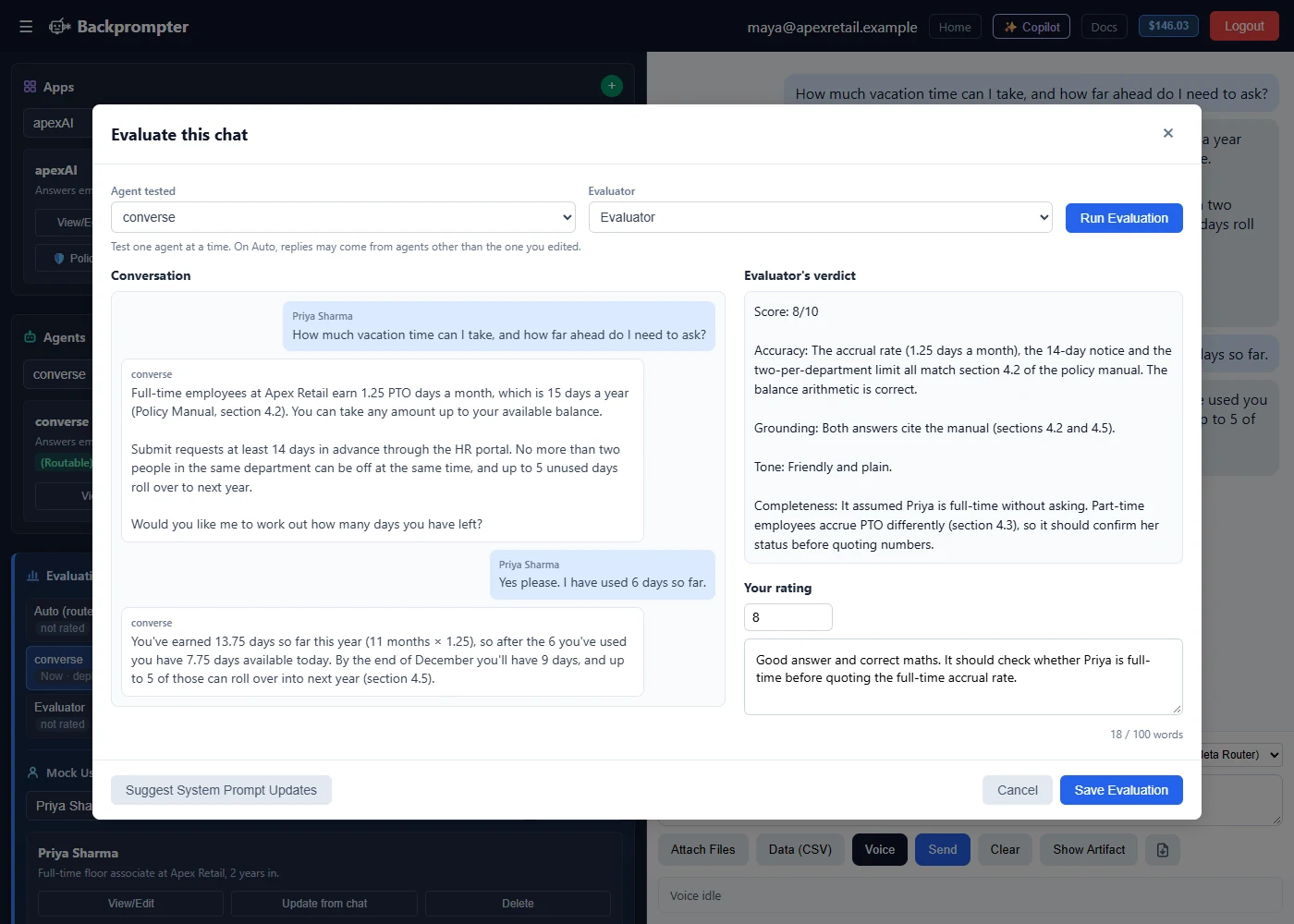
Most teams build an agent in one tool, test it in another and deploy it somewhere else. Conversations get exported and graded by hand, fixes get copied back into the prompt, and the tested agent has to be rebuilt or repackaged before it ships. In Backprompter, building, testing and deployment share one interface. Click Test Now and chat with the agent, run a simulated conversation, click Evaluate, apply the suggested fix where you wrote the prompt, retest, and promote the exact version that passed.
Why it's faster
- No handoffs: find the problem, fix it and retest on the same screen. Nothing is exported to a separate tool or copied back.
- The version you tested is the version you ship: promote the committed version to production. Nothing is rebuilt or repackaged, so it can't drift from what passed.
- Experts fix it themselves: the person who spots a wrong answer can fix it, test it and promote it, without waiting in a developer's queue.
- Changes don't touch your app: your app calls the agent through the API, SDKs or MCP, not the model. Tested prompt fixes and model switches go live without redeploying your app.
Why it builds better agents
- The same standards every time: every change and every model is tested against the same company rules, agent rules and evaluator agents, not graded differently by each team.
- Fixes come from the evidence: evaluator findings become suggested prompt changes, so the next test confirms the actual fix.
- Testing every change becomes practical: when testing is one click away, it happens on every change, and that is what catches regressions.
| With separate build, evaluation and deployment tools | In Backprompter |
|---|---|
| Export test results to another tool to grade them | Evaluate any test run with one click, inside the builder |
| Copy fixes back into the prompt by hand | Apply, discard or compare suggested prompt changes line by line, where you wrote the prompt |
| The version you tested and the version you ship can drift apart | Commit the tested version and promote that exact version to production |
| Repackage and redeploy the agent separately after every fix | Promote the tested version, with no changes to your app |
| Only the people with access to the evaluation tool can test | Domain experts and developers test, evaluate and fix the same agent |
| Another subscription and another integration to maintain | Included in the platform, with nothing to connect |
One product, one interface, from the first prompt to the version that ships.
Integrated testing that makes every agent better
- TestChat with the agent live, invite your team to try it, and run simulated users through everyday requests and edge cases.
- EvaluateClick Evaluate, choose the agent and the evaluator agent, and score the conversation against your company rules and the agent's own rules. Or run a batch evaluation to score many conversations at once.
- OptimizeBackprompter suggests prompt changes based on the evaluator's findings and your own feedback. Apply them, discard them or compare them line by line.
- RetestRun the tests again to confirm the fix worked and nothing else broke. Every version stays visible, so you can load and review any earlier one.
- ShipSave and Commit with a note on what changed, then promote the exact version that passed to production.
Repeat until the agent behaves as defined. Every future change goes through the same loop. Build
Guardrails from the whole company down to a single agent
Agents should follow the same rules your organization does. Backprompter tests every agent against two levels of rules: company rules your admin sets once for every agent, and agent rules defined in each agent's prompts as it is built. Every rule is tested, not just written down.
Company rules
Compliance, security, privacy and brand policies that apply to every agent built in Backprompter, including agents employees build for their own work. Every agent must pass all of them during testing. Teams can add rules, not remove them.
Agent rules
What this agent must always or never do, its tone and when it hands off to a person, defined in the prompts written during the build. Evaluator agents score the agent against them.
Company rules set the floor for every agent. Agent rules define what good looks like for each one. Both are tested before release. Solutions: Enterprise Soon
A flight simulator for your agent
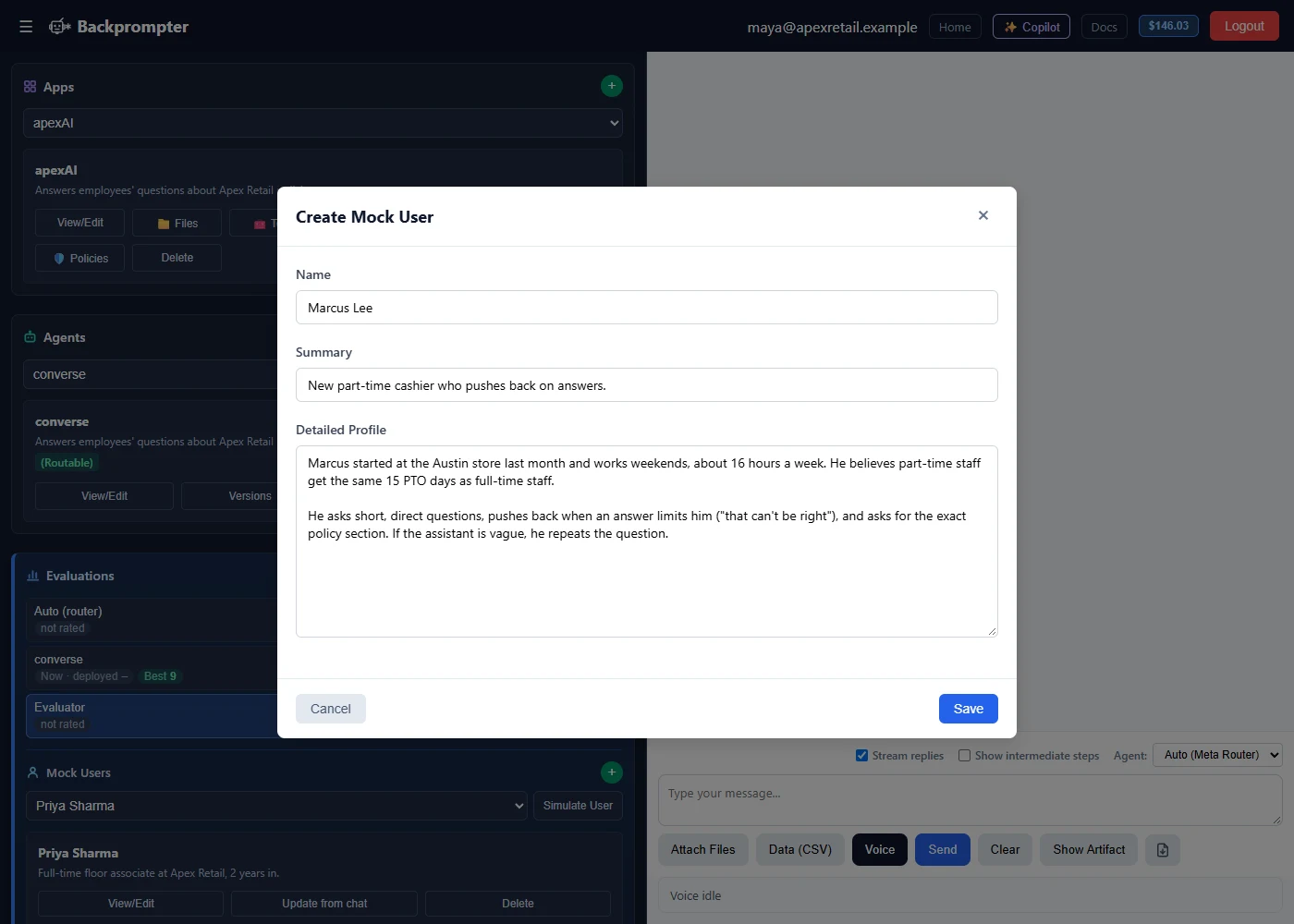
Real users don't follow the script. Backprompter simulates them, from routine questions to people who push back, change the subject or try to talk the agent out of its rules. Your evaluator agent scores every simulated conversation against your company rules and the agent's own rules, so you see how the agent really behaves before a customer does.
- Common cases first, then edge cases: prove the everyday answers, then find where the agent bends.
- Simulation and evaluation are separate: Backprompter plays the user and the evaluator agent grades, so scoring stays objective.
- Test the whole team: run simulated users through a router and its specialist agents to check that each message reaches the right agent.
Evaluate at scale, in one run
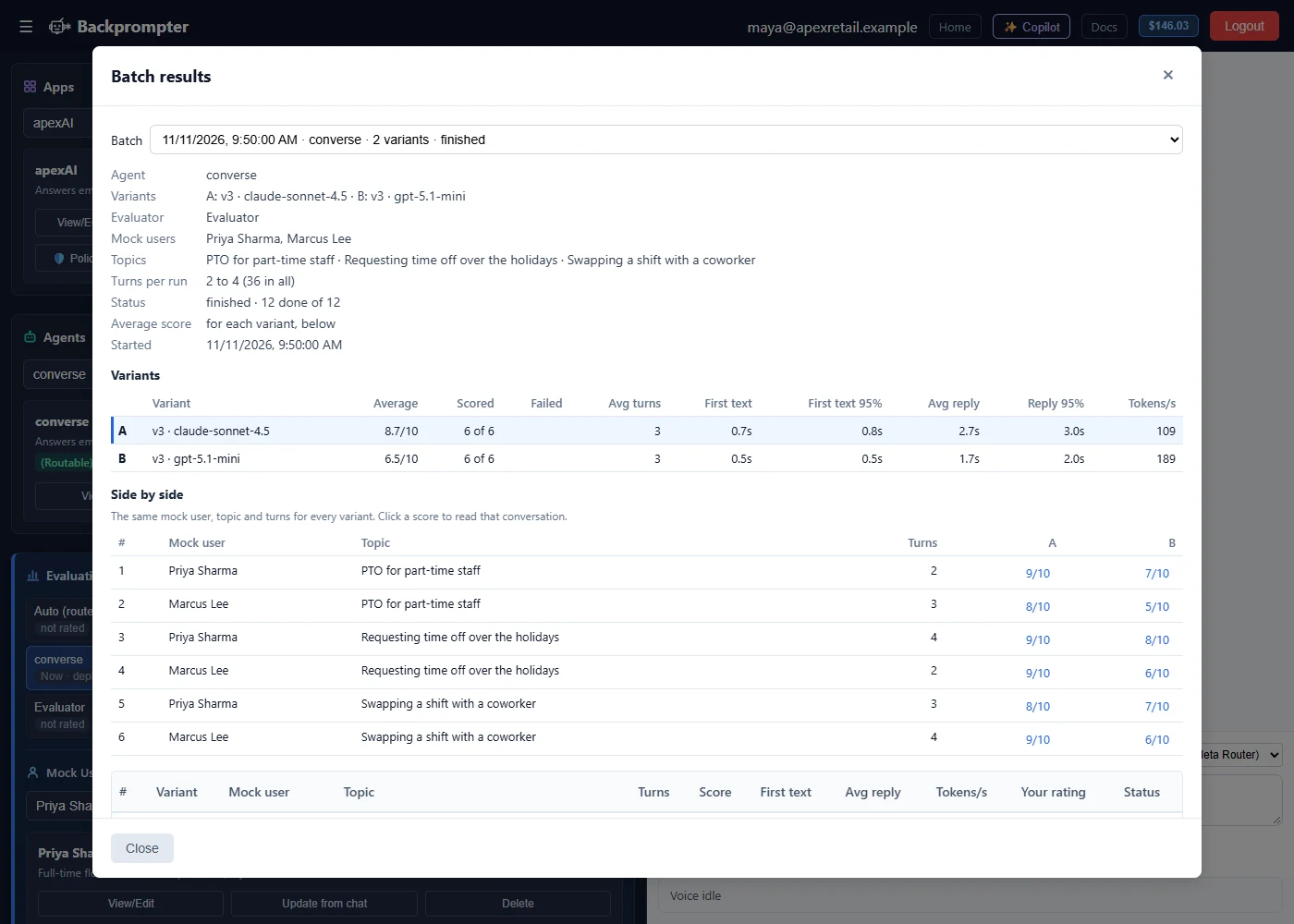
One test conversation shows how the agent handled one person. A batch evaluation runs many simulated conversations at once, across your mock users, agent versions and topics, and your evaluator scores every one. You see how the agent performs across the situations it will meet, not just in a single chat.
- Scale the evaluation process: run multiple mock users, agent versions and topics in one batch, in the background, while you keep working.
- Quality and latency: get an assessment of how well the agent responds and how quickly, across every run in the batch.
- Grounded in your knowledge: see each answer next to the matching passages from the knowledge base you provide, so the evaluator can check it is grounded.
- Find the better model faster: quickly compare up to four models or versions side by side, without creating a version for each one by hand. Test models
Open any run to read the conversation and add your own rating, so people stay in the loop.
Find the lowest-cost model that still passes
Frontier models are powerful and priced to match. Many jobs don't need them. Because testing lives in the same place you choose each agent's model, you can select a different model and run the same test process on it, from the newest frontier models to smaller and lower-cost versions, and let the results decide.
- Compare models in one batch: run a batch evaluation to compare up to four models side by side, without creating a version for each one by hand. Batch evaluation
- Same tests, different models: select a model, run the test process, then switch to a smaller, faster or earlier version and run it again, with the same simulated users and the same evaluator agent.
- See every variation: each model variation is saved as a version you can see and reload, so you can review where a lower-cost model holds up and where it falls short, using your own standards rather than public benchmarks.
- Pick the lowest-cost model that delivers the accuracy you need: keep frontier models for agents that reason through complex questions, and move routers, FAQ agents and simple tasks to models that cost less.
- Mix models within a team: each agent in a team can run on the model that fits its job, and each one is tested on it.
- Re-test when models change: a new model or version can change how your agent behaves, even when the prompt stays the same. When a provider releases a new version or retires an old one, run your evaluations again and promote the switch only when it passes. Your app calls the agent, not the model, so nothing in your app changes.
Pay for the capability the job needs, and prove it with your own tests. Build
Everything you need to test an agent, already built
Evaluator agents are built like any other agent, so you decide how they grade and what they return, from a single score to a detailed report.
Test Now
Chat with the agent the moment you write it, before you commit anything.
Simulated users
Backprompter plays everyday and difficult users, one conversation at a time or many at once in a batch, so you see behavior before customers do.
Evaluate against your standards
Evaluator agents you design score behavior and performance against the standards you set, from a single score to a detailed report.
Suggested fixes
Prompt changes from evaluator findings and your own feedback. Apply, discard or compare line by line
Layered rules
Company rules and agent rules, tested together before release.
Model testing
Run the same tests on different models, in one batch, and keep the lowest-cost one that meets your standard.
Versions
Save and Commit with notes, see every variation, load any earlier version, and promote the one that passed.
Private by default
No conversation logging by default. Save what you choose through the SDK.
Cloud or air-gapped
Same tests and evaluations in our cloud or on your own network.
The version that passes is the version that ships
Put your tested agent to work. Call it from your app through the API, SDKs or MCP, or publish it as a hosted chat, website embed or Slack app.