Ship validated agents, and verify every update performs as intended
Promote the agent that passed evaluation straight to production, with no backend to build. Call it from your app, publish it as a hosted chat or embed, and run it in our cloud or fully air-gapped. With testing and evaluation built in, you re-test every update before it goes live. And you can charge for your agent through your own Stripe account.
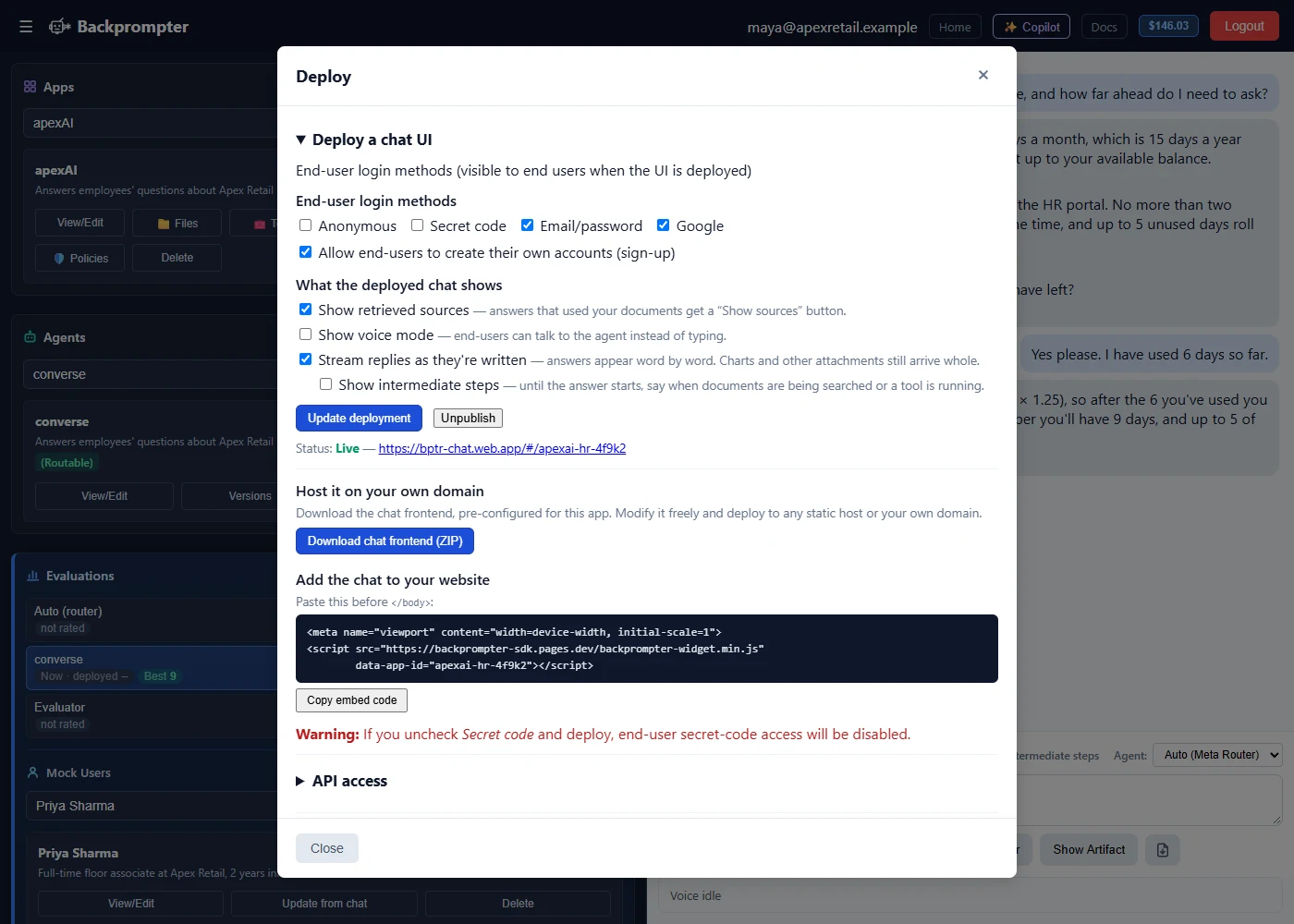
A proven agent shouldn't wait on infrastructure
Even when an agent is ready, putting it in front of users usually means building a user interface, sign-in, a server, a database, secure storage for API keys and data protections before anyone can use it. That work adds time and gives you more systems to maintain. In Backprompter, it's already built. A chat interface, hosting, end-user sign-in, per-user data, encrypted credentials and private-by-default data handling are part of the platform, so you can deploy validated agents without building any of it yourself.
What's already in place
Hosting
We run it in our cloud, or you run it on your own network.
Sign-in and per-user data
End users log in, and each one gets their own data and personalized answers.
Encrypted credentials
API keys and model keys are encrypted at rest and never displayed after saving.
Billing, when you want it
Connect your own Stripe account and charge end users.
Build, test and deploy in one place, with no handoffs
Deployment happens in the same platform where you built and tested the agent, not as a separate project. The version that passes your company rules and agent rules is the version you promote to production. Nothing is rebuilt, repackaged or copied into another tool, so what runs doesn't drift from what passed.
Build
Domain experts and developers define each agent in plain language, choose the model that fits its job and budget, and connect its tools and data.
Build 02 · TESTTest and evaluate
Simulated users put the agent through realistic scenarios, and evaluator agents you design score every run against your company rules and the agent's own rules.
Test and evaluateDeploy
Promote the exact version that passed, and serve it wherever your users are. Every later change goes back through the same loop.
| With separate build, test and deployment tools | In Backprompter |
|---|---|
| Rebuild or repackage the agent for production after testing | Promote the exact version that passed evaluation |
| Stand up servers, a database, sign-in and secrets before anyone can use it | Hosting, sign-in, per-user data and encrypted credentials are built in |
| Send every update through a separate test tool and deployment pipeline | Every update runs the same build, test and promote loop, in one place |
| Change code and redeploy your app to change the prompt or model | Your app calls the agent, so tested prompt fixes and model switches go live without redeploying your app |
| Build a billing system to charge users | Connect your own Stripe account |
One platform from first prompt to production, so every agent you ship is one you have proven.
One validated agent, available in every channel you need.
Use your agent the way that fits your needs. Run it as a stand-alone agent, published with no code as a chat app, a website embed or a Slack app. Or call it from the apps you build in Claude, ChatGPT or any development tool, through the API, SDKs or MCP. Use either option, or both at once. Every channel serves the same validated agent, so you never rebuild or re-test it for a new channel.
Stand-alone agent (no code)
Called from your apps
Deployed agents reach the systems and data your business runs on
Agents built in Backprompter do more than answer questions. Connect them to your APIs and MCP servers, ground them in your documents, and combine them into teams of specialists, and they can look up live data, take action in the systems your business runs on, and carry out multi-step work. An agent can check an order's status and start a return, pull a customer's account history before it answers, open and route a support ticket, or analyze a spreadsheet and return a chart. If a system has an API or an MCP server, your agents can work with it.
- APIs and MCP servers: define your API tools and MCP servers once per app, then choose which ones each agent can use to look up data and take action.
- Your knowledge: upload documents or URLs. Agents answer from them and show their sources.
- Agents calling agents: a router sends each message to the right specialist agent, and agent teams can call other agent teams as steps in multi-step work.
- Data and analysis: agents run calculations on your files and live data from connected systems, and reply with charts, tables or formatted reports.
- Credentials kept safe: connection credentials are encrypted and never displayed after saving.
Agents use code to analyze your files and live data from connected systems, and reply with charts, tables or formatted reports. Test and evaluate
Public or private, the same agent runs both ways
Most agents can serve users on the web. Some have to stay inside your network. Backprompter deploys both ways from the same agent definition, so you can serve customers in regulated industries without building a second version of your product.
Cloud (managed)
- Nothing to run. We host, maintain and update it.
- Serve users on the web through a hosted chat, website embed, Slack, the API, SDKs or MCP
- Any major model through OpenRouter, or bring your own keys
- Requests go only to model providers with zero-data-retention terms, including for voice
Self-hosted and air-gapped
- Runs on your own infrastructure with no internet connection required
- Serve users on your local network, from a single user to a team on your LAN
- Local model servers such as LM Studio, Ollama or vLLM, or other providers you choose
- Every prompt, document and user record stays inside your network
Private by default, wherever it runs
No conversation logging by default
Backprompter doesn't keep your users' conversations. The SDK lets you save any data you choose.
Zero data retention in our cloud
Model providers don't retain prompts or outputs, or use them to train their models.
Your keys, encrypted
Bring your own model keys. They are encrypted at rest and never displayed after saving.
Same builder, same agents, same evaluations. You choose where they run.
Scope a self-hosted deploymentKeep improving your agent after launch, without losing control
Launch is the start of an agent's life, not the end. Policies change, products change, and new models ship. In Backprompter, every update goes through the same build and test loop as the first version, so the people who know the job can keep the agent current, and every change is proven before users see it.
- Experts update it themselves: the support lead or benefits specialist changes the agent, tests it and promotes it, with no developer queue.
- Re-test every update: test each change against your company rules and the agent's own rules before anyone promotes it.
- Versions and rollback: Save and Commit with a note on what changed, compare versions, and roll back to any earlier version.
- Model changes, tested first: when a new or lower-cost model ships, run a batch evaluation on it and switch only when it passes. Your app calls the agent, not the model, so nothing in your app changes.
- Hand off with confidence: agencies can hand an agent to a client's business team, and the same standards protect every change they make.
Your agent evolves with your business, and you can test every new version against your company rules and agent rules before you promote it. Test and evaluate
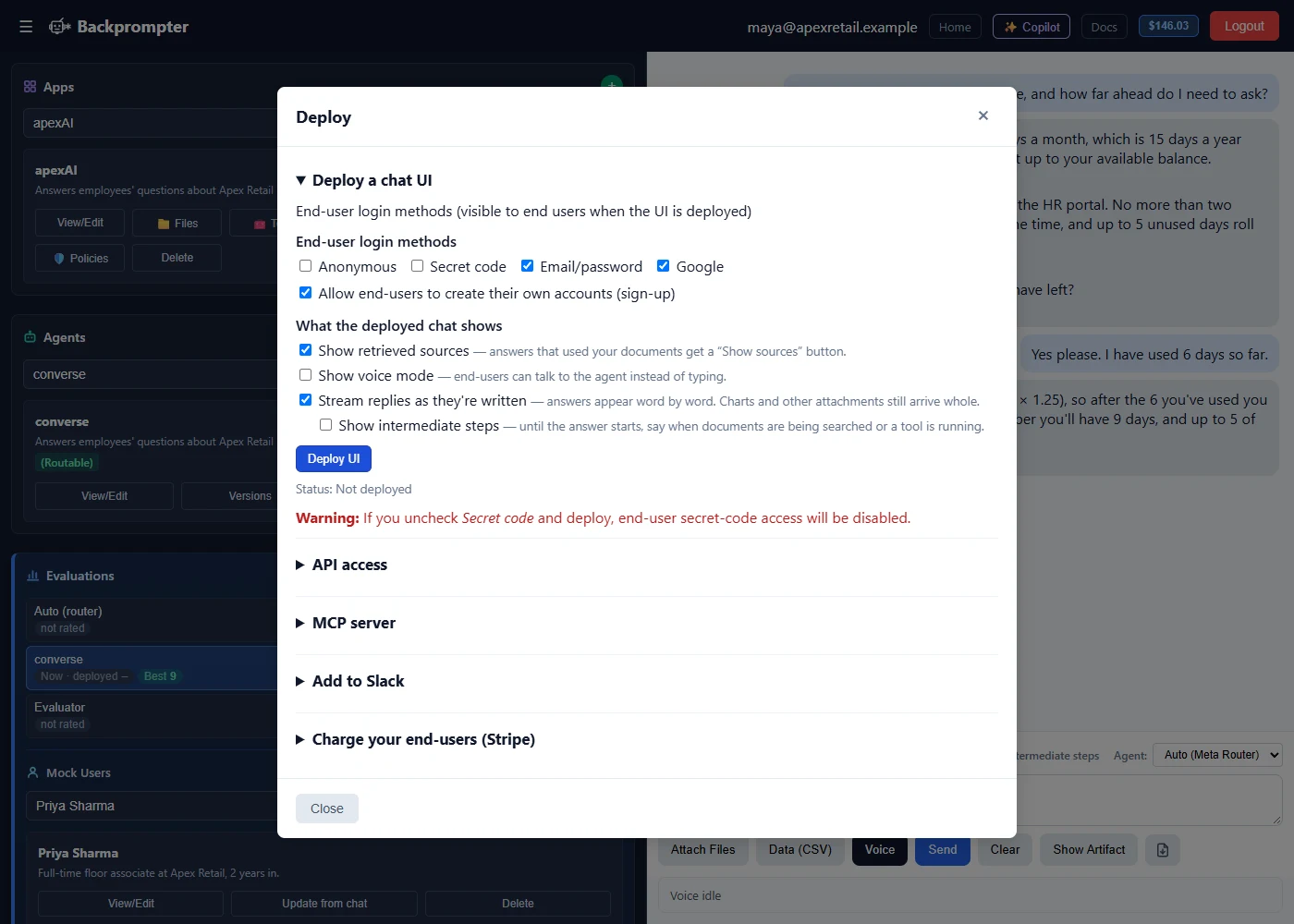
Turn a validated agent into a paid product
Connect your own Stripe account and charge end users for the agent you validated. Sign-in and per-user data are already built in, so there's no payment system, user database or account management to build. Payments go straight to your Stripe account, and Backprompter takes no share of your revenue (Stripe's standard processing fees apply).
Who it's for
- Developers and agencies: build agents for clients or the market, and charge for them from day one.
- Software teams: add a paid AI feature to your product with billing already in place.
Building agents for clients? Solutions: Developers and agencies Soon
Everything you need to run agents in production safely and reliably
Hosted chat
Publish a chat app with end-user sign-in and share it with a URL.
Embed and Slack
Put the agent on your website or in your Slack workspace.
API and SDKs
Call agents from your own front end or backend, and keep your UI and your auth.
MCP access
Call your agents from Claude Code, Codex, Cursor and other agents.
Your systems and data
Agents use your APIs, MCP servers and documents to work with live data.
Re-tested updates
Test every change against company rules and agent rules before you promote it.
Versions and rollback
Compare versions and roll back to any earlier one.
Private by default
No conversation logging by default, zero data retention in our cloud, or fully air-gapped.
Built-in billing
Charge end users through your own Stripe account, with no revenue share.
Build it, prove it, ship it, and run it in one platform
Backprompter takes an agent from plain-language prompt to tested, production-ready deployment, then runs it in our cloud or on your own network, without a backend to build or a separate tool to buy. See it work on your own agent.