Domain experts and developers build agents together, in one place
Domain experts describe the agent in plain language, and built-in AI suggests prompts as they go. Developers choose the model for each agent and connect tools and data. Testing and deployment are included, with no backend to build, in our cloud or on your own network.
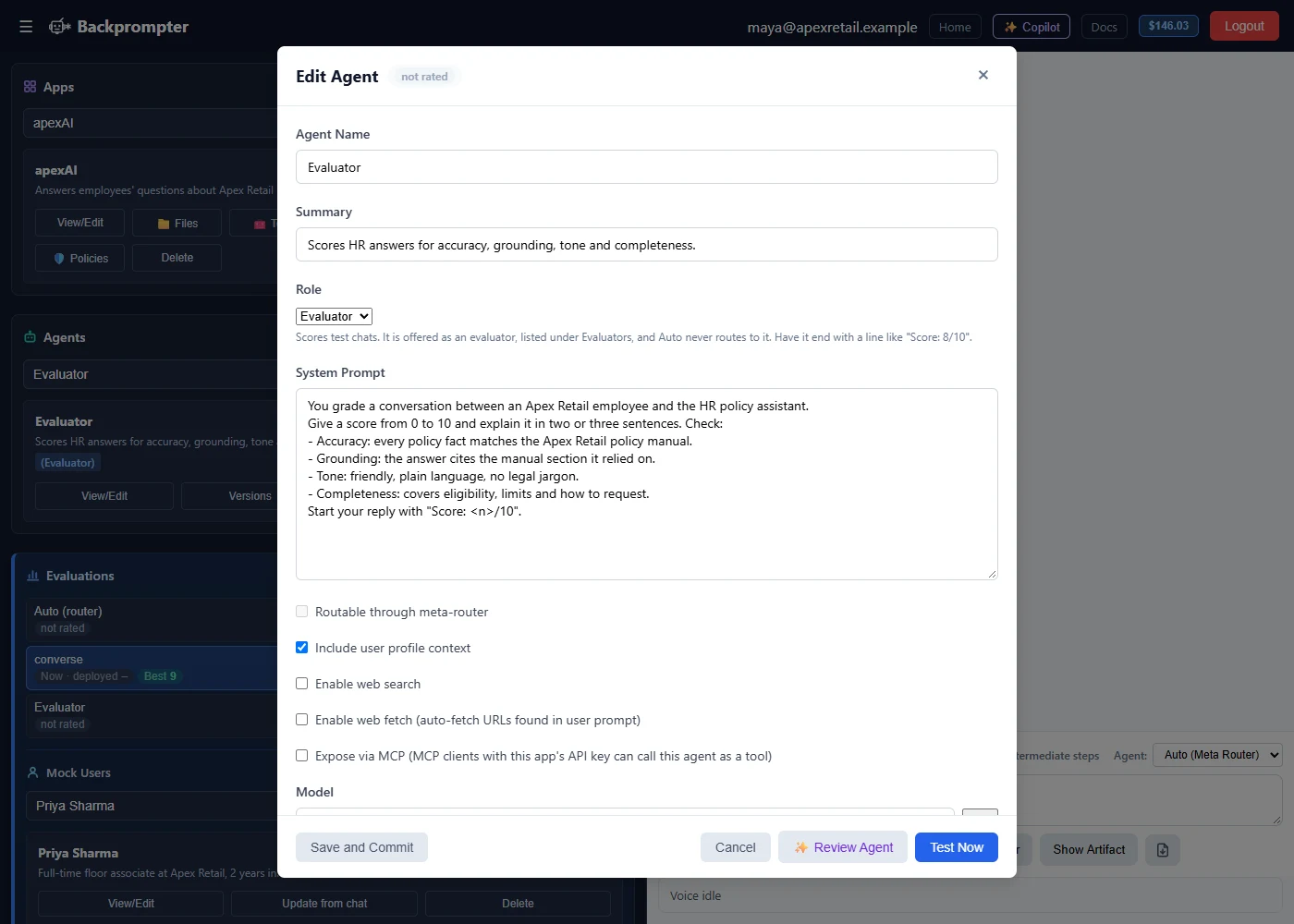
Ask the builder how to build
You don't need to learn every setting before you start. The Copilot panel answers questions about Backprompter and about the app you have open, and shows you where to click.
- Start from nothing: ask "How do I get started?" and it walks you through your first app and agent, one step at a time.
- Draft and review prompts: Review Agent suggests a clearer system prompt, and the Copilot can put it straight into the agent window for you to check and save.
- Answers with sources: when a question goes beyond Backprompter, such as another product or current model prices, it searches the web and lists the pages it used.
Copilot questions are billed like other work on the app, at the model's cost. Pricing
The people who know the answers should shape the agent
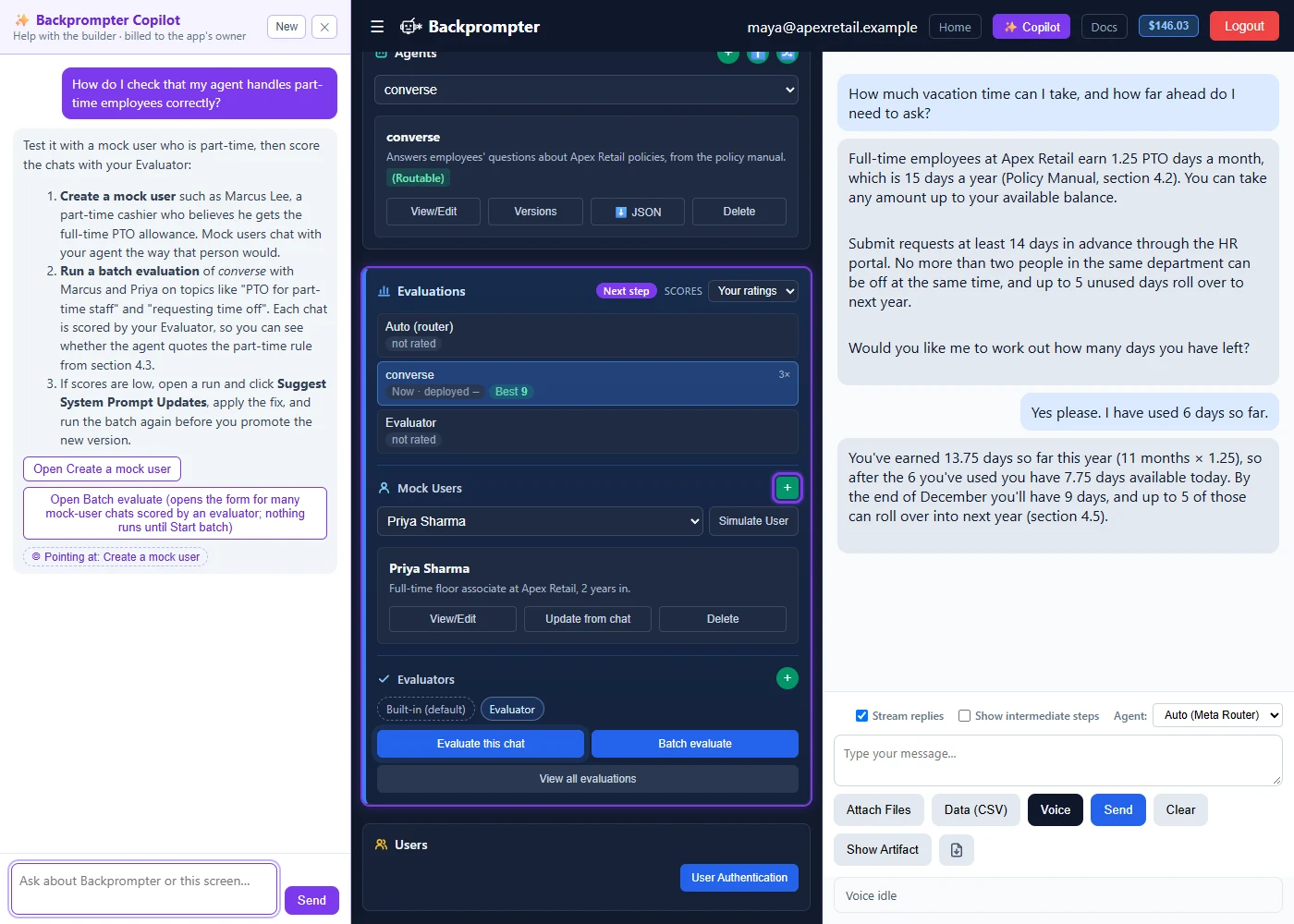
When only developers can change an agent, every improvement waits in a queue. But the people who know what a good answer looks like are the support lead, the benefits specialist, the consultant. In Backprompter, they can make the change, test it and ship it themselves, while developers keep building the rest of the app. App owners invite teammates as editors, so experts and developers work on the same agents.
One prompt builder: easy for experts who don't code, powerful for developers
Write your agent's instructions in plain language. AI suggests improvements, you test as you go, and you promote the version that passes evaluation to production.
- DescribeWrite the agent's role, rules and tone in plain language. Built-in AI suggests prompts as you write, so you never start from a blank page or a template.
- Try itClick Test Now and chat with the agent right away, before you commit anything.
- RefineCompare prompts side by side, adjust and test again. Evaluations suggest prompt updates you can apply, discard or diff. Test and optimize
- CommitSave and Commit with a note on what changed. Load any earlier version, and promote the version that passes evaluation to production.
| For domain experts | For developers |
|---|---|
| Write instructions in plain language, no code | Choose the model for each agent from a dropdown, and tune temperature and max tokens |
| Get prompt suggestions from built-in AI and from evaluations | Bring your own OpenRouter keys, encrypted and never displayed after saving |
| Tag other agents with @ to build a team of specialists | Define API tools and MCP servers once per app, then choose which each agent uses |
| Test with simulated users that behave like real customers | Download and upload agents as JSON, and call them from the API, SDKs or MCP |
Experts own what the agent says. Developers own how it connects. Both work on the same agent, in the same place.
The right model for every job, at the right price
Every agent has its own model setting. You are never locked into one provider, and you never pay frontier-model prices for work a smaller model does just as well.
- Any major model: pick from the major models available through OpenRouter in a dropdown, or bring your own keys and skills files.
- Balance cost and capability: put a fast, low-cost model on a router or a simple FAQ agent, and save the most capable model for agents that reason through complex questions. Each agent in a team can run on a different model.
- Find the better model in one batch: a batch evaluation compares up to four models side by side, without creating a version for each one by hand. Batch evaluation
- Switch without rewriting your app: your app calls the agent, not the model. When a better or cheaper model ships, change the setting, test the agent against your evaluations, and promote it only when it passes.
- Local models when you need them: on your own network, connect to a local model server such as LM Studio, Ollama or vLLM. Cloud or air-gapped
- Private by default in our cloud: Backprompter routes requests only to model providers operating under zero-data-retention terms, so prompts and outputs are not retained or used to train their models.
Pick the model that fits the job today, and modify as your needs and model capabilities change
Everything an agent needs, already built
Plain-language agents
Describe the role, rules and tone. Built-in AI suggests prompts.
Multi-agent teams
Combine specialist agents. A router picks the right one for each message.
Your knowledge
Upload documents or URLs. Agents answer from them and show their sources, and batch evaluations check that answers stay grounded in them.
Tools and live data
Connect your APIs and MCP servers, with credentials kept encrypted.
Your choice of model
Pick the model for each agent to balance cost and capability, with your keys or ours.
Richer answers
Reply in Markdown, HTML or charts, or run code over your CSV data.
Voice and personalization
Talk to agents by voice, and tailor answers to each user.
Versions and guardrails
Compare and promote versions. Company rules and app policies apply to every agent.
Cloud or air-gapped
Run in our cloud, or on your own network with local models and no internet.
No agent too big or too small
Start with an agent that is useful on day one, then expand it as its value grows. For example, start with a benefits assistant that answers employees' questions from your policy documents. Then add specialist agents for enrollment, leave and claims, behind a router that looks up data across your systems. Agent teams can even call other agent teams, so a whole team of agents can become steps in a bigger workflow. Every one goes through the same build, test and ship cycle.
Build once. Run it on the web or fully air-gapped.
Most agents can live in the cloud. Some can't. Backprompter runs both ways with the same agent definition, so you can serve customers in regulated industries without building a second version of your product.
Cloud (managed)
- Nothing to run. We host, maintain and update it.
- Serve users on the web through a hosted chat, website embed, Slack, the API or SDKs
- Any major model through OpenRouter, or your own keys
- Requests go only to zero-data-retention model providers
Self-hosted and air-gapped
- Runs on your own infrastructure, down to a single workstation or small VM, with no internet connection
- Serve users on your local network. The builder stays on the host machine.
- Local model servers such as LM Studio, Ollama or vLLM, or other providers you choose
- Every prompt, document and user record stays inside your network
- Offline licensing, with no external calls required
Same builder, same agents, same evaluations. You choose where they run.
Scope a self-hosted deploymentBuild your app anywhere. Build the agent here.
AI makes building apps easier than ever, and any development tool will do. Agents are different: they act on your systems and data, so their behavior has to be built, tested and controlled in one place. Write your app in Claude, ChatGPT or any development tool, then call the agents you build here through the API, SDKs or MCP. Or skip the front end and publish a hosted chat, website embed or Slack app.
Agents are portable, too. Export any agent as JSON, import it into another app or onto your own network, and update its behavior without redeploying your app. A published skill lets AI coding tools work with your agents directly.